最近比较火的《高性价比人生指南》,我也部署了一份
CentOS上安装Hermes
这两天准备折腾Hermes,有几台服务器,正好用起来。服务器都用的CentOS。
查看了一下Python和node的版本,yum update之后,python –version为3.8.6,node –version 为20.15.0,python版本不够,需要更新。
干脆安装一下版本管理器,管理多个版本吧。按照搜索到的指令执行:
git clone https://github.com/pyenv/pyenv.git ~/.pyenv
echo 'export PYENV_ROOT="$HOME/.pyenv"' >> ~/.bashrc
echo 'export PATH="$PYENV_ROOT/bin:$PATH"' >> ~/.bashrc
exec $SHELL
pyenv install 3.12
执行最后一步时,是去下载https://www.python.org/ftp/python/3.12.13/Python-3.12.13.tar.xz文件并安装,结果是下载失败,报如下错误:
pyenv install 3.12
WARNING: Please make sure you remove any previous custom paths from your /root/.pydistutils.cfg file.
Downloading Python-3.12.13.tar.xz...
-> https://www.python.org/ftp/python/3.12.13/Python-3.12.13.tar.xz
Installing Python-3.12.13...

BUILD FAILED (AlibabaCloud 3 using python-build 2.7.2-3-gb52a8e3f)

Inspect or clean up the working tree at /tmp/python-build.20260621104116.2054996
Results logged to /tmp/python-build.20260621104116.2054996.log

Last 10 log lines:
  File "/tmp/python-build.20260621104116.2054996/Python-3.12.13/Lib/ensurepip/__init__.py", line 200, in _bootstrap
    return _run_pip([*args, *_PACKAGE_NAMES], additional_paths)
           ^^^^^^^^^^^^^^^^^^^^^^^^^^^^^^^^^^^^^^^^^^^^^^^^^^^^
  File "/tmp/python-build.20260621104116.2054996/Python-3.12.13/Lib/ensurepip/__init__.py", line 101, in _run_pip
    return subprocess.run(cmd, check=True).returncode
           ^^^^^^^^^^^^^^^^^^^^^^^^^^^^^^^
  File "/tmp/python-build.20260621104116.2054996/Python-3.12.13/Lib/subprocess.py", line 571, in run
    raise CalledProcessError(retcode, process.args,
subprocess.CalledProcessError: Command '['/tmp/python-build.20260621104116.2054996/Python-3.12.13/python', '-W', 'ignore::DeprecationWarning', '-c', '\nimport runpy\nimport sys\nsys.path = [\'/tmp/tmp1f5v8plg/pip-25.0.1-py3-none-any.whl\'] + sys.path\nsys.argv[1:] = [\'install\', \'--no-cache-dir\', \'--no-index\', \'--find-links\', \'/tmp/tmp1f5v8plg\', \'--root\', \'/\', \'--upgrade\', \'pip\']\nrunpy.run_module("pip", run_name="__main__", alter_sys=True)\n']' returned non-zero exit status 1.
make: *** [Makefile:2027: install] Error 1
询问Gemini后,提示是缺少必要的包的问题,给了两种方案,一种是设置忽略安全验证直接安装,一种是安装必要的依赖。我采用了安装必要依赖的方案。在服务器上执行如下脚本:
sudo dnf install -y gcc make zlib-devel bzip2 bzip2-devel readline-devel sqlite sqlite-devel openssl-devel tk-devel libffi-devel xz-devel上述指令执行成功后,再次执行python12的安装指令:pyenv install 3.12
一台机器上执行成功,另外一台失败。执行成功的机器上,执行pyenv 3.12.13之后提示成功,但是执行python –versioin 的时候,仍然是旧版本,后来查询之后,发现需要执行指令:eval “$(pyenv init -)” ,source ~/.zshrc。执行此指令之后,再执行查看版本指令,现在对了。
参考文章《https://cloud.tencent.com/developer/article/2671206》来安装Hermes
1、克隆项目 git clone https://gitcode.com/GitHub_Trending/he/hermes-agent.git
2、将代码复制到安装目录
mkdir -p ~/.hermes
cp -r ~/hermes-agent ~/.hermes/hermes-agent
3、进入到安装目录并执行安装
cd ~/.hermes/hermes-agent && bash scripts/install.sh
我执行完这一步之后,日志出现如下信息:
✓ Main package installed (hash-verified via uv.lock)

✓ All dependencies installed

→ Installing Node.js dependencies (browser tools)...

⚠ npm install failed (browser tools may not work)

✓ Node.js dependencies installed

→ Installing browser engine (Playwright Chromium)...

⚠ Playwright does not support automatic dependency installation on alinux.

→ Install Chromium/browser system dependencies for your distribution, then run:

→   cd /root/.hermes/hermes-agent && npx playwright install chromium

→ Browser tools will not work until dependencies are installed.
问Gemini,提示让执行一些指令来安装依赖,执行了如下指令:
安装chromium底层依赖:yum install -y nss alsa-lib atk at-spi2-atk cups-libs libdrm \
libXcomposite libXdamage libXext libXfixes libXrandr mesa-libgbm \
pango cairo libxshmfence
手动安装PlayWright chromium:npx playwright install chromium
安装完成后,再次执行harmes的安装指令,这次能正常完成了。
linux服务器上部署v2raya
最近折腾n8n,结果好多服务、mcp都需要代理,不然的话用不起来。暂时又不想搞个境外服务器,因为阿里云和腾讯云的服务器就好几个了。于是想在其中一台机器上装个代理的镜像,然后本机器或者其他的机器使用这个代理。
我的服务器都是centos,首先在一台机器上安装下镜像,参考官方文档《https://v2raya.org/docs/prologue/installation/docker/》。
如果没有特别的设置,那么直接按照命令去执行就行。但是这个应用使用范围这么广,特定的端口肯定被扫描了,所以放在服务器上的话还是改一下端口比较好。
这是一个传统后端启动的示例:
docker run -d \
  --restart=always \
  --privileged \
  --network=host \
  --name v2raya \
  -e V2RAYA_LOG_FILE=/tmp/v2raya.log \
  -e V2RAYA_V2RAY_BIN=/usr/local/bin/v2ray \
  -e V2RAYA_NFTABLES_SUPPORT=off \
  -e IPTABLES_MODE=legacy \
  -v /lib/modules:/lib/modules:ro \
  -v /etc/resolv.conf:/etc/resolv.conf \
  -v /etc/v2raya:/etc/v2raya \
  mzz2017/v2raya
自己的话,肯定要修改一下端口,所以选择使用下边这个示例
docker run -d \
  -p 2017:2017 \
  -p 20170-20172:20170-20172 \
  --restart=always \
  --name v2raya \
  -e V2RAYA_V2RAY_BIN=/usr/local/bin/v2ray \
  -e V2RAYA_LOG_FILE=/tmp/v2raya.log \
  -v /etc/v2raya:/etc/v2raya \
  mzz2017/v2raya
安装成功,把指定的端口在防火墙里放开,用本机的浏览器直接访问,可行。创建了账号,然后导入订阅,到此为止,目前还算正常。
但是还需要验证。用ping没法加代理,于是用yum install httping安装了httping工具。
直接执行httping -x localhost:20170 -g http://www.google.com 反回了short read during receiving reply-headers from host。
点着点着发现v2ray2的页面里,点开导入的配置之后,需要选中线路并连接。。。忘了这茬。选中常用线路,点击“connect”,emmm,报了failed to connect: failed to connect: not support Trojan: strconv.Atoi: parsing “”: invalid syntax。根据文档《https://feiniu.nas50.cn/forum.php?mod=viewthread&tid=1792》操作时,点击“启动”的时候报failed to start v2ray-core: not support Trojan: strconv.Atoi: parsing “”: invalid syntax,搜了一下,这个问题好像讨论的不多。
docker各种不好使,但是应该是我使用的不对。最终在服务器上直接装的。
先到发布文件页面下载文件https://github.com/v2rayA/v2rayA/releases,我下载了linux的运行文件和rpm文件,最终使用的rpm文件。
然后使用命令 sudo yum install installer_redhat_x64_2.2.7.4.rpm 安装了下载的rpm包。
systemctl start v2raya 启动服务
systemctl enable v2raya 设置为开机启动
到服务器网络策略里,把2017的端口放开。访问ip:2017,发现服务没正常启动,去服务器的/var/log/v2raya.log里去看日志,发现在在在下载必要的文件“downloading missing geoip.dat and geosite.dat”。但是因为当前服务器还没代理,这些文件也下载不下来。
https://github.com/v2fly/geoip/releases/latest/download/geoip.dat
我把之前用docker启动时候运行时创建的文件给复制到对应的下载目录去了,启动,可以正常启动了
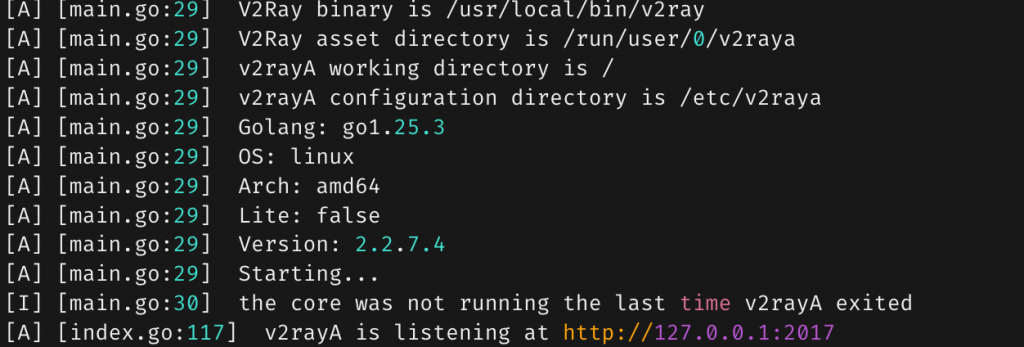
通过浏览器访问管理页面,正常。再选中线路,然后启动,又报错了:
Failed to start: main/commands: failed to load config: [/etc/v2raya/config.json] > infra/conf/rule: invalid field rule > infra/conf/rule: failed to load geoip: private > infra/conf/geodata/memconservative: failed to decode geodata file: geoip.dat > infra/conf/geodata/memconservative: country code private not found in geoip.dat

看起来有点像是我复制过来的文件有点问题。
终于,在重启服务的时候发现,/etc/v2raya下的文件都会被替换。config.json来自哪里还不确定,但是两个ip文件是来自/root/.local/share/v2ray 这里。把我自己下载的文件挪到这个目录来,重启,再次到管理页面点启动,OK了!